Nissan Altima (L32) 2007-2012 Service Manual: Low tire pressure warning lamp
blinks
Low Tire Pressure Warning Lamp Flashes When
Ignition Switch Is Turned On
NOTE:
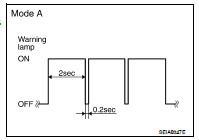
If low tire pressure warning lamp flashes as shown, the system is normal.
Flash Mode A
• This mode shows transmitter status is OFF-mode.
Carry out transmitter wake up operation. Refer to WT-5, "Transmitter
Wake Up Operation".
DIAGNOSTIC PROCEDURE
1.CHECK BCM CONNECTORS
1. Turn ignition switch OFF.
2. Disconnect BCM harness connectors.
3. Check terminals for damage or loose connections.
Is the Inspection result normal?
YES >> GO TO 2
NO >> Repair or replace damaged parts.
2.CHECK TIRE PRESSURE WARNING CHECK CONNECTOR CIRCUIT
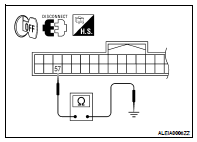
Check continuity between BCM harness connector M18 terminal 57 and ground.
Continuity should not exist.
Is the Inspection result normal?
YES >> Replace BCM. Refer to BCS-96, "Removal and Installation".
NO >> Repair circuit for short to ground.
Low Tire Pressure Warning Lamp Stays On When
Ignition Switch Is Turned On
DIAGNOSTIC PROCEDURE
1.CHECK BCM CONNECTORS
1. Turn ignition switch OFF.
2. Disconnect BCM harness connectors.
3. Ch ...
Hazard Warning Lamps Flash When Ignition
Switch Is Turned On
DIAGNOSTIC PROCEDURE
1.CHECK BCM GROUND CIRCUIT
Check BCM ground circuit. Refer to BCS-42, "Diagnosis Procedure".
Is the i ...
Other materials: Voice commands
Voice commands can be used to operate
the Bluetooth Hands-Free Phone System.
Press and hold thebutton for less
than 1.5 seconds to bring up the phone
command menu. The commands available
are:
Call <name>
Dial <number>
Recent Calls
Read/Send Text (if so equipped)
Siri (if so equipp ...
Cruise control operations
The cruise control allows driving at a speed
between 25 - 89 mph (40 - 144 km/h) without
keeping your foot on the accelerator
pedal.
To turn on the cruise control, push the
cruise control switch on. The
indicator
in the instrument panel will illuminate.
To set cruising speed, accelerate the veh ...
How to use the vehicle information
display
The vehicle information display can be
changed using the ,
, and OK buttons located on the
steering
wheel.
- Use these buttons
to navigate the vehicle information
display.
OK - Change or select an item in the
vehicle information display.
- Returns to the previous
menu.
The OK, a ...

 Low tire pressure warning lamp
stays on
 Hazard warning lamps flash
