Nissan Altima (L32) 2007-2012 Service Manual: On-vehicle repair
TRANSMISSION CONTROL MODULE
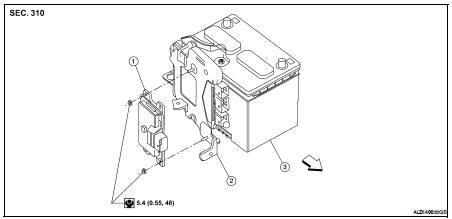
Exploded View
1. TCM
2. Bracket
3. Battery
Removal and Installation
REMOVAL
1. Disconnect the battery negative terminal. Refer to PG-139, "Removal and
Installation".
2. Remove the fresh air intake tube (upper) EM-25, "Removal and Installation".
3. Disconnect the TCM harness connector.
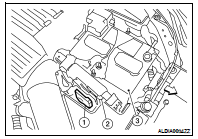
4. Remove the TCM (1) from the bracket (2).
• Battery (3)
INSTALLATION
Installation is in the reverse order of removal.
Inspection and Adjustment
INSPECTION
1. Place selector lever in “P” position, and turn ignition switch ON (engine
stop).
2. Make sure that selector lever can be shifted to other than “P†...
Exploded View
1. Control lever knob
2. Lock pin
3. Knob cover
4. Control device selector plate
5. Control device assembly
Removal and Installation
REMOVAL
1. Remove the center console assem ...
Other materials: Tachometer
5 inch (13 cm) Type A (if so equipped)
The tachometer indicates engine speed in
revolutions per minute (rpm).
Do not rev the engine into the red zone 1.
7 inch (18 cm) Type B (if so equipped)
CAUTION
When engine speed approaches the
red zone, shift to a higher gear or reduce
engine speed. Operati ...
HomeLink Universal Transceiver
(if so equipped)
The HomeLink Universal Transceiver provides
a convenient way to consolidate the
functions of up to three individual handheld
transmitters into one built-in device.
HomeLink Universal Transceiver:
Will operate most radio frequency devices
such as garage doors, gates, home
and office lighting, en ...
Storage
Front-door pockets
Seatback pockets (if so equipped)
The seatback pockets may be located on
the back of the passenger’s seat. The pockets
can be used to store maps.
WARNING
To ensure proper operation of the driver’s
and/or front passenger's NISSAN Advanced
Air Bag System (if so equipped),
plea ...



 CVT Position
 Control device