Nissan Altima (L32) 2007-2012 Service Manual: Refrigerant pressure sensor
Removal and Installation for Refrigerant Pressure
Sensor
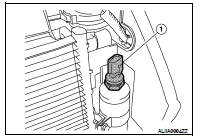
REMOVAL
1. Discharge the refrigerant. Refer to HA-32, "HFC-134a (R-134a) Service
Procedure".
2. Remove the front grille. Refer to EXT-17, "Removal and Installation".
3. Disconnect the refrigerant pressure sensor connector and
remove the refrigerant pressure sensor (1) from the liquid tank
on the condenser.
CAUTION:
Do not damage the condenser fins.
INSTALLATION
Installation is in the reverse order of removal.
Refer to HA-31, "Component".
CAUTION:
Replace the O-ring of the refrigerant pressure sensor with a new one, then apply
compressor oil to it
when installing it.
Removal and Installation
REMOVAL
1. From under the vehicle, disconnect the ambient sensor connector
(2).
2. Release the ambient sensor clip and remove the ambient sensor
(1).
INSTALLATION
I ...
Removal and Installation for Expansion Valve
REMOVAL
1. Discharge the refrigerant. Refer to HA-32, "HFC-134a (R-134a) Service
Procedure".
2. Remove the strut tower bar. Refer to FSU-1 ...
Other materials: NISSAN Intelligent Key Operation
You can lock or unlock the doors and trunk
lid without taking the Intelligent Key out of
your pocket or bag.
When you carry the Intelligent Key with you,
you can lock or unlock all doors and trunk
lid by pushing the door handle request
switch (if so equipped) within the range of
operation.
Lockin ...
NISSAN Intelligent Key System
WARNING
Radio waves could adversely affect
electric medical equipment. Those
who use a pacemaker should contact
the electric medical equipment
manufacturer for the possible influences
before use.
The Intelligent Key transmits radio
waves when the buttons are pressed.
The FAA advises the ra ...
How to use the vehicle information
display
The vehicle information display can be
changed using the ,
, and OK buttons located on the
steering
wheel.
- Use these buttons
to navigate the vehicle information
display.
OK - Change or select an item in the
vehicle information display.
- Returns to the previous
menu.
The OK, and
butto ...

 Ambient sensor
 Expansion valve