Nissan Altima (L32) 2007-2012 Service Manual: Satellite radio tuner
Diagnosis Procedure
1.CHECK FUSES
Check that the following fuses are not blown.
Are the fuses OK?
YES >> GO TO 2
NO >> If fuse is blown, be sure to eliminate cause of malfunction before
installing new fuse.
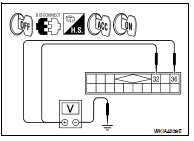
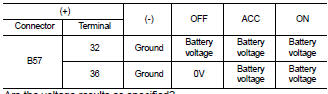
2.POWER SUPPLY CIRCUIT CHECK
1. Turn ignition switch OFF.
2. Disconnect satellite radio tuner (factory installed) connector B57.
3. Check voltage between the satellite radio tuner (factory installed) and
ground.
Are the voltage results as specified?
YES >> GO TO 3
NO >> • Check connector housings for disconnected or loose
terminals.
• Repair harness or connector.
3.GROUND CIRCUIT CHECK
Inspect satellite radio tuner (factory installed) case ground.
Does case ground pass inspection?
YES >> Inspection End.
NO >> Repair satellite radio tuner (factory installed) case ground.
Diagnosis Procedure
1.CHECK FUSE
Check for blown fuses.
Are the fuses OK?
YES >> GO TO 2
NO >> Be sure to eliminate cause of malfunction before installing new fuse.
2.CHECK POWER ...
Diagnosis Procedure
1.CHECK FUSE
Check that the following fuses of the Bluetooth control unit are not blown.
Are the fuses OK?
YES >> GO TO 2
NO >> Be sure to eliminate cause of mal ...
Other materials: Bluetooth connections screen
"" (back) key
Bluetooth tab
Connections screen
"Add New" key
"" (settings) key
"" (info) key
"" (Bluetooth Audio
connection) key
"" (Bluetooth Hands-Free
Phone System connection) key
Access the Connections screen to change
settings and view Bluetooth information.
To access the Connec ...
Rear-facing child restraint installation
using the seat belts
WARNING
The three-point seat belt with Automatic
Locking Retractor (ALR) must be
used when installing a child restraint.
Failure to use the ALR mode will result
in the child restraint not being properly
secured. The restraint could tip over or
be loose and cause injury to a child in a
sudden stop o ...


 Bose speaker AMP
 Bluetooth control unit