Nissan Altima (L32) 2007-2012 Service Manual: Sunload sensor
Removal and Installation
REMOVAL
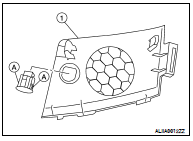
1. Remove the front RH speaker grille (1). Refer to AV-73,
"Removal and Installation".
2. Disconnect the connector.
3. Release the sunload sensor tabs (A) to remove it from the front
RH speaker grille (1).
INSTALLATION
Installation is in the reverse order of removal.
Removal and Installation
REMOVAL
1. Remove the instrument lower cover LH. Refer to IP-12, "Removal and
Installation".
2. Remove the in-vehicle sensor screw and remove the in-vehicle
...
Removal and Installation
REMOVAL
1. Remove the evaporator. Refer to VTL-20, "Removal and Installation".
2. Release the intake sensor clip and then remove the intake sensor.
CAUTION: ...
Other materials: Programming trouble-diagnosis
If the HomeLink does not quickly learn the
hand-held transmitter information:
Replace the hand-held transmitter batteries
with new batteries.
Position the hand-held transmitter with
its battery area facing away from the
HomeLink surface.
Press and hold both the HomeLink and
hand-held transmi ...
Heated steering wheel switch (if so equipped)
Push the heated steering wheel switch to
warm the steering wheel after the ignition
switch is placed in the ON position. The
indicator light will come on.
If the surface temperature of the steering
wheel is below 68ºF (20ºC), the system will
heat the steering wheel and cycle off and
on to mainta ...
Intelligent Around View Monitor
system operation
With the ignition switch in the ON position,
move the shift lever to the R (Reverse) position
or press the CAMERA button to operate
the Intelligent Around View Monitor.
The screen displayed on the Intelligent
Around View Monitor will automatically return
to the previous screen 3 minutes after
the C ...

 In-vehicle sensor
 Intake sensor