Nissan Altima (L32) 2007-2012 Service Manual: The parking brake release warning continues
displaying, or does not
display
Description
• The parking brake warning is displayed while driving the vehicle even
though the parking brake is released.
• The parking brake warning is not displayed even though driving the vehicle
with the parking brake applied.
Diagnosis Procedure
1.CHECK PARKING BRAKE WARNING LAMP OPERATION
1. Start engine.
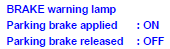
2. Monitor “BRAKE” warning lamp while applying and releasing the parking brake.
Is the inspection result normal?
YES >> Replace combination meter. Refer to MWI-176, "Removal and Installation".
NO >> GO TO 2
2.CHECK PARKING BRAKE SWITCH SIGNAL CIRCUIT
1. Turn ignition switch OFF.
2. Check the parking brake switch signal circuit. Refer to MWI-49, "Diagnosis
Procedure".
Is the inspection result normal?
YES >> GO TO 3
NG >> Repair harness or connector.
3.CHECK PARKING BRAKE SWITCH UNIT
Perform a unit check for the parking brake switch. Refer to MWI-50,
"Component Inspection".
Is the inspection result normal?
YES >> Replace combination meter. Refer to MWI-176, "Removal and Installation".
NO >> Replace parking brake switch.
Description
The oil pressure warning lamp remains illuminated while the engine is running
(normal oil pressure).
Diagnosis Procedure
1.CHECK OIL PRESSURE WARNING LAMP
Perform IPDM E/R auto acti ...
Description
• The warning is still displayed even after washer fluid is added.
• The warning is not displayed even though the washer tank is empty.
Diagnosis Procedure
1.CHECK WASHER LEVEL ...
Other materials: Vehicle information display - 5 inch (13 cm) Type A (if so equipped)
The vehicle information display is located
to the left of the speedometer. It displays
such items as:
Vehicle settings
Indicators and warnings
Information/warning messages
Tire pressure information
Drive computer information
Cruise control system information
Driving Aids (if so equipped)
N ...
System maintenance
The two radar sensors 1 for the BSW and
RCTA systems are located near the rear
bumper. Always keep the area near the radar
sensors clean.
The radar sensors may be blocked by temporary
ambient conditions such as splashing
water, mist or fog.
The blocked condition may also be caused
by objects such ...
Outside mirrors
The outside mirror remote control only operates
when the ignition switch is placed in
the ON position.
Move the small switch 1 to select the right
or left mirror. Adjust each mirror to the desired
position using the large switch 2.
Move the small switch 1 to the center
(neutral) position to preve ...

 The oil pressure warning lamp does not turn off
 The low washer fluid warning continues
displaying, or does not display
The low washer fluid warning continues
displaying, or does not display