Nissan Altima (L32) 2007-2012 Service Manual: Air cleaner filter
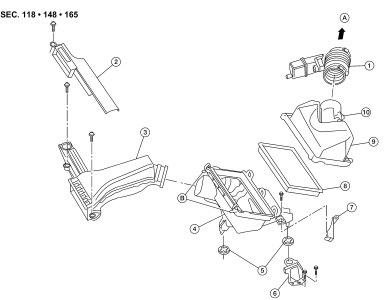
Removal and Installation
1. Air duct hose
2. Duct sub-cover
3. Front air duct
4. Air cleaner case (lower)
5. Grommets
6. Air cleaner case mounting bracket
7. Bracket
8. Air cleaner filter
9. Air cleaner case (upper)
10. Mass air flow sensor
A. To electric throttle control actuator
B. Air cleaner case side clips
CHANGING THE AIR CLEANER FILTER
CAUTION:
It is not necessary to remove the front air duct to replace the ail cleaner
filter.
1. Unhook the air cleaner case side clips.
2. Remove the air cleaner filter.
3. Install a new air cleaner filter.
4. Lock the air cleaner case side clips.
Checking Drive Belts
1. Power steering pump
2. Drive belt auto-tensioner
3. Crankshaft
4. Idler pulley
5. A/C compressor pulley
6. Generator pulley
7. Idler pulley
8. Drive belt
A. Indicato ...
Valve Clearance
CHECKING
• Perform inspection as follows after removal, installation or replacement
of camshaft or valve related parts, or if there is unusual
engine conditions regarding valve c ...
Other materials: Vehicle information display warnings
and indicators
The following messages may appear in
your vehicle information display.
Engine start operation for
Intelligent Key system (if
I-Key battery level is low)
This indicator appears when the battery of
the Intelligent Key is low and when the Intelligent
Key system and the vehicle are not
communicating no ...
Manual shift mode (if so
equipped)
When the shift lever is in the D (Drive) position
and the drive sport mode switch is
pushed, the transmission is ready for the
manual shift mode. Shift ranges can be
selected manually by pulling the right-side
or left-side paddle shifter.
When shifting up, pull the right side paddle
shifter (+) B. ...
BSW system operation
For vehicles with the 7 inch (18 cm) display
Side BSW/RCTA Indicator Light
BSW indicator
The BSW system operates above approximately
20 mph (32 km/h).
If the radar sensors detect a vehicle in the
detection zone, the side BSW/RCTA indicator
light (1) illuminates. If the turn signal is
then acti ...

 Drive belts
 Camshaft valve clearance