Nissan Altima (L32) 2007-2012 Service Manual: Bose speaker AMP
Removal and Installation - Coupe
REMOVAL
1. Disconnect the negative battery terminal.
2. Remove the trunk floor carpet and spare tire cover. Refer to INT-23, "Removal
and Installation".
3. Remove the RH trunk floor spacer.
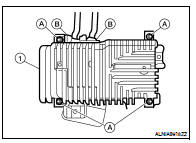
4. Remove the Bose speaker amp. screws (A), then disconnect the
Bose speaker amp. connectors (B) and remove the Bose
speaker amp. (1).
INSTALLATION
Installation is in the reverse order of removal.
Removal and Installation - Sedan
REMOVAL
1. Disconnect the negative battery terminal.
2. Open the trunk lid.
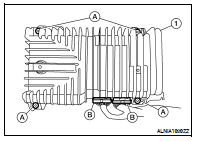
3. Remove the Bose speaker amp. screws (A), then disconnect the
Bose speaker amp. connectors (B) and remove the Bose
speaker amp. (1).
INSTALLATION
Installation is in the reverse order of removal.
Removal and Installation
REMOVAL
1. Remove cluster lid C. Refer to IP-12, "Removal and Installation".
2. Remove cluster lid D lower finisher. Refer to IP-12, "Removal and
Instal ...
Removal and Installation
REMOVAL
1. Remove the Cluster D lower finisher. Refer to IP-12, "Removal and
Installation".
2. Put selector lever in the drive "D" position (CVT mo ...
Other materials: Seat belt warning light and chime
The driver and front passenger seat is
equipped with an enhanced seat belt reminder
function.
A visual and audible alert will operate at
speeds of approximately 9 mph (15 km/h)
or more under the following conditions:
If the driver seat belt is not fastened.
The front passenger’s seat belt is ...
Forward-facing child restraint
installation using the seat belts
WARNING
The three-point seat belt with Automatic
Locking Retractor (ALR) must be
used when installing a child restraint.
Failure to use the ALR mode will result
in the child restraint not being properly
secured. The restraint could tip over or
be loose and cause injury to a child in a
sudden stop o ...
Intelligent Around View Monitor
system operation
With the ignition switch in the ON position,
move the shift lever to the R (Reverse) position
or press the CAMERA button to operate
the Intelligent Around View Monitor.
The screen displayed on the Intelligent
Around View Monitor will automatically return
to the previous screen 3 minutes after
the C ...

 Audio unit
 CD Changer