Nissan Altima (L32) 2007-2012 Service Manual: Front tweeter
Removal and Installation
REMOVAL
1. Remove the front pillar finisher. Refer to INT-15, "Removal and
Installation" (coupe) and INT-36, "Removal
and Installation" (sedan).
2. Remove tweeter speaker grille. Refer to IP-12, "Removal and Installation".
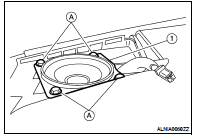
3. Remove the tweeter speaker screws (A), disconnect the tweeter
speaker connector and remove the tweeter speaker (1).
INSTALLATION
Installation is in the reverse order of removal.
Removal and Installation
REMOVAL
1. Remove the Cluster D lower finisher. Refer to IP-12, "Removal and
Installation".
2. Put selector lever in the drive "D" position (CVT mo ...
Removal and Installation
REMOVAL
1. Remove the center speaker grille. Refer to IP-12, "Removal and
Installation".
2. Remove the center speaker screws (A), then pull out the center
s ...
Other materials: Moving Object Detection (MOD)
(if so equipped)
CAMERA button
WARNING
Failure to follow the warnings and instructions
for proper use of the Moving
Object Detection (MOD) system could
result in serious injury or death
The MOD system is not a substitute
for proper vehicle operation and is
not designed to prevent contact with
objects surrou ...
Making a call
1. Press thebutton on the Launch
Bar.
The "Phone" screen will appear on the
display.
2. Select one of the options to make a call.
Phonebook
To access the phonebook:
1. Press thebutton on the
steering
wheel or touch the "" key on the
launch bar.
2. Touch the "Phonebook" key.
3. Choose the desir ...
Starting the engine
1. Apply the parking brake.
2. Move the shift lever to P (Park) or N (Neutral).
P (Park) is recommended.
The starter is designed not to operate
if the shift lever is in any of the driving
positions.
3. Push the ignition switch to the ON position.
Depress the brake pedal and push
the ignition swi ...

 CD Changer
 Center speaker