Nissan Altima (L32) 2007-2012 Service Manual: Mudguard
Removal and Installation
REMOVAL
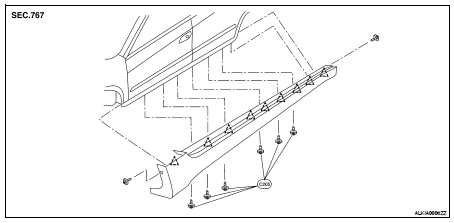
1. Remove the C205 push-pins located on the under body.
2. Remove the center mudguard screws and remove the center mudguard.
INSTALLATION
Installation is in the reverse order of removal.
Removal and Installation
1. Fender protector
2. Fender protector side cover
A. J-clips
B. Clips
C. Center mudguard screw
a. Sheet metal nut
REMOVAL
1. Remove the engine under cover. Refer ...
Removal and Installation
1. Double-faced adhesive tape
Removal
CAUTION:
Never apply tack-paper adhesive remover to body panel surface finished with
lacquer-based paints.
• Original side g ...
Other materials: Child safety
WARNING
Do not allow children to play with the
seat belts. Most seating positions are
equipped with Automatic Locking Retractor
(ALR) mode seat belts. If the seat
belt becomes wrapped around a child’s
neck with the ALR mode activated, the
child can be seriously injured or killed if
the seat belt r ...
Rear Door Alert
The Rear Door Alert system functions under
certain conditions to indicate there
may be an object or passenger in the rear
seat(s). Check the seat(s) before exiting the
vehicle.
The Rear Door Alert system is initially disabled.
The driver can enable the system
using the vehicle information display. ...
RearView Monitor (if so equipped)
CAMERA or DISP button
WARNING
Failure to follow the warnings and instructions
for proper use of the Rear-
View Monitor system could result in
serious injury or death.
RearView Monitor is a convenience
feature and is not a substitute for
proper backing. Always turn and look
out the windo ...


 Fender protector
 Side guard molding