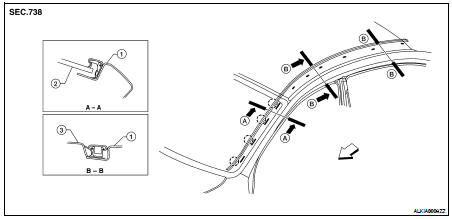
Nissan Altima (L32) 2007-2012 Service Manual: Roof side molding
Removal and Installation
1. Body side outer panel
2. Windshield
2. Windshield
REMOVAL
1. Lift and twist the roof side molding up from the rear edge.
2. Disconnect the roof side molding from the clips, and remove the roof side
molding.
INSTALLATION
Installation is in the reverse order of removal.
• Engage the roof molding into the clips starting at the rear.
Removal and Installation
REMOVAL
1. Using a trim stick or equivalent, disconnect the drip mouldings starting
at the front, working rearward.
2. Remove the drip moldings.
INSTALLATION
Ins ...
Removal and Installation
1. License lamp finisher
REMOVAL
1. Remove the trunk lid finisher (if equipped). Refer to INT-22, "Exploded
View".
2. Remove the license lamp finisher nuts ...
Other materials: Interior lights
The interior light can be turned on regardless
of door position. The light will
go off after a period of time unless the
ignition switch is placed in the ON position
when any door is opened.
The interior lights can be set to operate
when the doors are opened. To turn off
the interior light ...
Moonroof (if so equipped)
Power moonroof
The moonroof will only operate when the
ignition switch is placed in the ON position.
The power moonroof is operational for a
period of time, even if the ignition switch is
placed in the AUTO ACC or OFF position. If
the driver's door or the front passenger's
door is opened during th ...
BSW system limitations
WARNING
Listed below are the system limitations
for the BSW system. Failure to operate
the vehicle in accordance with these
system limitations could result in serious
injury or death.
The BSW system cannot detect all vehicles
under all conditions.
The radar sensors may not be able to
detect and ...



 Drip molding
 License lamp finisher