Nissan Altima (L32) 2007-2012 Service Manual: Microphone
Removal and Installation
REMOVAL
1. Remove the room/map lamp assembly. Refer to INL-121, "Removal and
Installation".
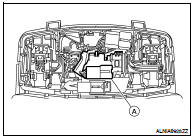
2. Detach the microphone connector (A).
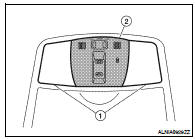
3. Remove the map lamp covers (1), then remove the map lamp
assembly cover (2).
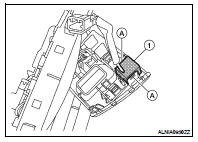
4. Release the microphone tabs (A), then remove the microphone
(1).
INSTALLATION
Installation is in the reverse order of removal.
Removal and Installation - Coupe
REMOVAL
1. Remove the rear pillar finisher RH. Refer to INT-20, "Exploded View".
2. Detach the antenna amp harness clip (B), disconnect the
antenna am ...
Removal and Installation
REMOVAL
1. Remove the license plate finisher. Refer to EXT-23, "Removal and
Installation" (coupe) and EXT-46,
"Removal and Installation" (sedan).
...
Other materials: Rear-facing child restraint installation
using LATCH
For additional information, see all Warnings
and Cautions in the "Child safety"
and "Child restraints" before installing
a child restraint.
Do not use the lower anchors if the combined
weight of the child and the child restraint
exceeds 65 lbs. (29.5 kg). If the combined
weight of the child and the ...
Operating ProPILOT Assist
Push the ProPILOT Assist switch A. This
turns on the ProPILOT Assist system.
A screen is displayed for a period of time
that indicates the status of the driving
aid functions.
AEB with Pedestrian Detection, LDW,
and BSW are enabled when the specified
driving aid is shaded.
I-LI is ...
Rear Cross Traffic Alert (RCTA)
WARNING
Failure to follow the warnings and instructions
for proper use of the RCTA
could result in serious injury or death.
The RCTA system is not a replacement
for proper driving procedures
and is not designed to prevent contact
with vehicles or objects. When
backing out of a parking space, a ...

 Antenna AMP
 Rear view camera