Nissan Altima (L32) 2007-2012 Service Manual: Drive belts
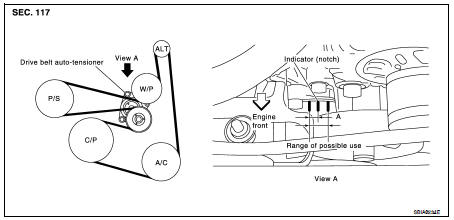
Checking Drive Belts
WARNING:
Inspect the drive belt only when the engine is stopped.
NOTE:
On vehicles not equipped with A/C, there is an idler pulley in the position for
the drive belt routing.
• Make sure that the stamp mark of drive belt auto-tensioner is within the
usable range.
NOTE:
• Check the drive belt auto-tensioner indicator (notch) when the engine is cold.
• When the new drive belt is installed, the range should be “A” as shown.
• Visually check entire belt for wear, damage or cracks.
• If the indicator is out of allowable use range or belt is damaged, replace the
belt.
Tension Adjustment
• Belt tension is not manually adjustable, it is automatically adjusted by
the drive belt auto-tensioner.
Changing Engine Coolant
WARNING:
• To avoid being scalded, never change the coolant when the engine is hot.
• Wrap a thick cloth around cap and carefully remove the cap. First, turn the
cap ...
Other materials: Head restraints/headrests
WARNING
Head restraints/headrests supplement
the other vehicle safety systems. They
may provide additional protection
against injury in certain rear end collisions.
Adjustable head restraints/
headrests must be adjusted properly,
as specified in this section. Check the
adjustment after someone else ...
Tachometer
5 inch (13 cm) Type A (if so equipped)
The tachometer indicates engine speed in
revolutions per minute (rpm).
Do not rev the engine into the red zone 1.
7 inch (18 cm) Type B (if so equipped)
CAUTION
When engine speed approaches the
red zone, shift to a higher gear or reduce
engine speed. Operati ...
Oil control system (if so equipped)
The oil control system can be accessed in
the Maintenance portion of the vehicle information
display settings.
Engine oil information informs the distance
to oil change. Never exceed one year or
7,500 miles (12000 km) between oil change
intervals for the 2.0L 4 cylinder (KR20DDET
engine model) or 1 ...

 Engine maintenance (QR25DE)
 Engine coolant