Nissan Altima (L32) 2007-2012 Service Manual: Front door speaker
Removal and Installation
REMOVAL
1. Remove the front door finisher. Refer to INT-12, "Removal and
Installation" (coupe) and INT-34, "Removal
and Installation" (sedan).
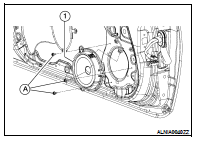
2. Remove the front door speaker screws (A), then disconnect the
front door speaker connector and remove the front door speaker
(1).
INSTALLATION
Installation is in the reverse order of removal.
Removal and Installation
REMOVAL
1. Remove the front pillar finisher. Refer to INT-15, "Removal and
Installation" (coupe) and INT-36, "Removal
and Installation" (sedan).
2. ...
Removal and Installation - Coupe
REMOVAL
1. Remove the trunk front finisher. Refer to INT-23, "Removal and
Installation".
2. Remove the rear speaker screws (A), then disconnect the r ...
Other materials: Manual operation
Fan speed control buttons
Press the fan speed control
buttons
to manually control the fan speed.
Press the AUTO button to return to automatic
control of the fan speed.
Temperature control dial
The temperature control dial allows you to
adjust the temperature of the outlet air. To
lower the tempera ...
Heater operation
Heating
This mode is used to direct heated air to
the foot outlets. Some air also flows from
the defrost outlets and the side vent
outlets.
1. Press thebutton to the off
position
for normal heating.
2. Press theair flow control
button.
3. Turn thefan speed control dial
to
the desired position.
...
Turning the AEB with Pedestrian
Detection system ON/OFF
For vehicles with the 7 inch (18 cm) display
For vehicles with the 5 inch (13 cm) display
Perform the following steps to enable or
disable the AEB with Pedestrian Detection
system.
For vehicles with the 7 inch (18 cm) display.
1. Press the button until
"Settings" displays
in the vehicle informati ...

 Front tweeter
 Rear speaker