Nissan Altima (L33) 2013-2018 Owners Manual: Speedometer and odometer
Speedometer
The speedometer indicates vehicle speed.
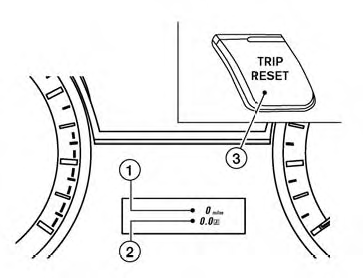
Odometer/Twin trip odometer
The odometer 1 and the twin trip odometer 2
are displayed below the Vehicle Information Display
when the ignition switch is placed in the ON
position.
The odometer records the total distance the vehicle
has been driven.
The twin trip odometer records the distance of
individual trips.
Changing the display:
Pushing the TRIP RESET 3 switch on the left of
the instrument panel to change the display as
follows:
Trip Resetting the trip odometer:
Pushing the TRIP RESET switch 3 for more
than 1 second resets the currently displayed trip
odometer to zero.
Average fuel economy and distance to empty
information is also available. See “Vehicle Information
Display” in this section.
1. Tachometer
2. Warning/indicator lights
3. Vehicle Information Display
4. Speedometer
5. Fuel gauge
6. Odometer/Twin trip odometer
7. Engine coolant temperature gauge ...
The tachometer indicates engine speed in revolutions
per minute (rpm). Do not rev engine into
the red zone 1 .
CAUTION
When engine speed approaches the red
zone, shift to a higher gear or reduc ...
Other materials: Folding rear seat
Interior trunk access
The trunk can be accessed from the driver
side and passenger side of the rear seat for
loading and unloading, as shown.
1. Move the front passenger seat to the
most forward position.
2. Open the access cover on the rear parcel
shelf.
3. Insert a key or another suitable tool
...
NISSAN Advanced Air Bag System
Top tether strap anchor
Roof-mounted curtain side-impact and
rollover supplemental air bag inflators
Rear seat belts
Roof-mounted curtain side-impact and
rollover supplemental air bag
Front seat-mounted side-impact supplemental
air bag
Head restraints/headrests
Front seat belts
Side-imp ...
Wireless charger (if so equipped)
Indicator
Charging pad
The wireless charger is located on the front
of the center console. Lay the smartphone
on the pad of the wireless charger. Charging
will start automatically. The smartphone
will be charged continuously while
the ignition switch is in the ON position.
NOTE:
The wireless ch ...


 → Trip
 → Trip
 Meters and gauges
 Tachometer