Nissan Altima (L32) 2007-2012 Service Manual: BCM (Body control module)
Diagnosis Procedure
1. CHECK FUSE AND FUSIBLE LINK
Check if the following BCM fuse or fusible link are blown.
Is the fuse or fusible link blown?
YES >> Replace the blown fuse or fusible link after repairing the affected
circuit.
NO >> GO TO 2
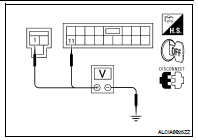
2. CHECK POWER SUPPLY CIRCUIT
1. Turn ignition switch OFF.
2. Disconnect BCM.
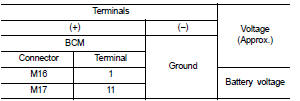
3. Check voltage between BCM harness connector and ground.
Is the measurement normal?
YES >> GO TO 3
NO >> Repair or replace harness.
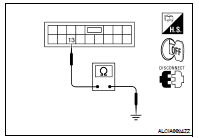
3. CHECK GROUND CIRCUIT
Check continuity between BCM harness connector and ground.
Does continuity exist?
YES >> Inspection End.
NO >> Repair or replace harness.
Special Repair Requirement
1. REQUIRED WORK WHEN REPLACING BCM
Initialize control unit. Refer to BCS-6, "CONFIGURATION (BCM) : Special
Repair Requirement".
>> Work End.
Diagnosis Procedure
1.CHECK FUSES
Check for blown combination meter fuses.
Is the inspection result normal?
YES >> GO TO 2
NO >> If fuse is blown, be sure to eliminate cause ...
Diagnosis Procedure
1. CHECK FUSES AND FUSIBLE LINK
Check that the following IPDM E/R fuses or fusible link are not blown.
Is the fuse blown?
YES >> Replace the blown fuse or fusible link ...
Other materials: Heated seat switches (if so equipped)
WARNING
Do not use or allow occupants to use
the seat heater if you or the occupants
cannot monitor elevated seat temperatures
or have an inability to feel
pain in body parts that contact the
seat. Use of the seat heater by such
people could result in serious injury.
CAUTION
The battery could run ...
System maintenance
The two radar sensors 1 for the BSW and
RCTA systems are located near the rear
bumper. Always keep the area near the radar
sensors clean.
The radar sensors may be blocked by temporary
ambient conditions such as splashing
water, mist or fog.
The blocked condition may also be caused
by objects such ...
How to use the vehicle information
display
The vehicle information display can be
changed using the ,
, and OK buttons located on the
steering
wheel.
- Use these buttons
to navigate the vehicle information
display.
OK - Change or select an item in the
vehicle information display.
- Returns to the previous
menu.
The OK, a ...



 Combination meter
 IPDM E/R (Intelligent power distribution
module engine room)
IPDM E/R (Intelligent power distribution
module engine room)