Nissan Altima (L32) 2007-2012 Service Manual: Front door speaker
Removal and Installation
REMOVAL
1. Remove the front door finisher. Refer to INT-12, "Removal and
Installation" (coupe) and INT-34, "Removal
and Installation" (sedan).
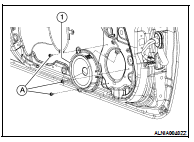
2. Remove the front door speaker screws (A), then disconnect the
front door speaker connector and remove the front door speaker
(1).
INSTALLATION
Installation is in the reverse order of removal.
Removal and Installation
REMOVAL
1. Remove the center speaker grille. Refer to IP-12, "Removal and
Installation".
2. Remove the center speaker screws (A), then pull out the center
s ...
Removal and Installation - Sedan
REMOVAL
1. Remove the rear door finisher. Refer to INT-34, "Removal and
Installation".
2. Remove the rear door speaker screws (A), then disconnect th ...
Other materials: How to use the vehicle information
display
The vehicle information display can be
changed using the ,
, and OK buttons located on the
steering
wheel.
- Use these buttons
to navigate the vehicle information
display.
OK - Change or select an item in the
vehicle information display.
- Returns to the previous
menu.
The OK, a ...
Precautions on seat belt usage
If you are wearing your seat belt properly
adjusted and you are sitting upright and
well back in your seat with both feet on the
floor, your chances of being injured or killed
in a collision and/or the severity of injury
may be greatly reduced. NISSAN strongly
encourages you and all of your passeng ...
Settings
The setting mode allows you to change the
information displayed in the vehicle information
display. It also allows you to change
vehicle functions:
VDC
Driver Assistance
Clock
Meter Settings
Vehicle Settings
Maintenance
Alarm
Tire Pressures
Unit
Language
Factory Reset
VDC
The VDC Settin ...

 Center speaker
 Rear door speaker