Nissan Altima (L32) 2007-2012 Service Manual: Front door speaker (sedan)
Description
The audio unit sends audio signals to the front door speakers using the
door speaker circuits.
Diagnosis Procedure
1.HARNESS CHECK
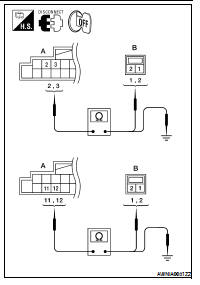
1. Disconnect audio unit connector M43 (A) and suspect speaker
connector (B).
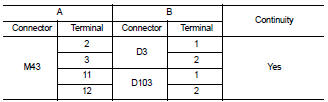
2. Check continuity between audio unit harness connector M43 (A)
terminal and suspect speaker harness connector (B) terminal.
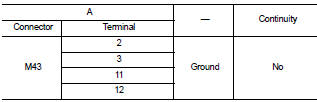
3. Check continuity between audio unit harness connector M43 (A)
terminal and ground.
Are continuity results as specified?
YES >> GO TO 2
NO >> • Check connector housings for disconnected or loose terminals.
• Repair harness or connector.
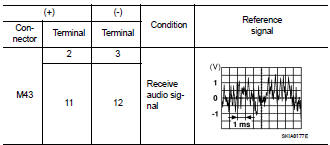
2.FRONT DOOR SPEAKER SIGNAL CHECK
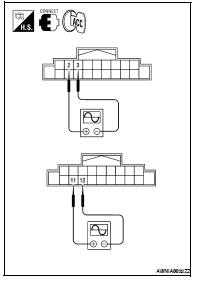
1. Connect audio unit connector and front speaker connector.
2. Turn ignition switch to ACC.
3. Push “POWER” switch.
4. Check the signal between audio unit harness connector terminals
with CONSULT-III or oscilloscope.
Is the audio signal voltage as specified?
YES >> Replace speaker. Refer to AV-74, "Removal and Installation".
NO >> Replace audio unit. Refer to AV-72, "Removal and
Installation".
Description
The audio unit sends audio signals to the door speakers using the door
speaker circuits.
Diagnosis Procedure
1.HARNESS CHECK
1. Disconnect audio unit connector M43 (A) and suspect s ...
Description
The audio unit sends audio signals to the front tweeters using the door
speaker circuits.
Diagnosis Procedure
1.HARNESS CHECK
1. Disconnect audio unit connector M43 (A) and suspect ...
Other materials: Bluetooth connections screen
"" (back) key
Bluetooth tab
Connections screen
"Add New" key
"" (settings) key
"" (info) key
"" (Bluetooth Audio
connection) key
"" (Bluetooth Hands-Free
Phone System connection) key
Access the Connections screen to change
settings and view Bluetooth information.
To access the Connec ...
Trip computer
1. Vehicle speed
The vehicle speed mode shows the current
vehicle speed and the average vehicle
speed since the last reset.
Average vehicle speed:
Press the OK button on the steering wheel
to bring up the drive computer Reset
menu, and follow the instructions to reset.
For additional information, ...
Intelligent Around View Monitor
system operation
With the ignition switch in the ON position,
move the shift lever to the R (Reverse) position
or press the CAMERA button to operate
the Intelligent Around View Monitor.
The screen displayed on the Intelligent
Around View Monitor will automatically return
to the previous screen 3 minutes after
the C ...

 Door speaker (coupe)
 Front tweeter (coupe)