Nissan Altima (L32) 2007-2012 Service Manual: Front stabilizer
Removal and Installation
REMOVAL
1. Remove steering gear. Refer to ST-17, "Removal and Installation".
2. Remove mounting nuts on upper portion of stabilizer connecting
rod.
3. Remove stabilizer clamp bolts.
4. Remove stabilizer from the vehicle.
INSPECTION AFTER REMOVAL
Check stabilizer, connecting rod, bushing and clamp for deformation, cracks
and damage, and replace if necessary.
INSTALLATION
Installation is in the reverse order of removal.
• Refer to FSU-12, "Exploded View" for tightening torque.
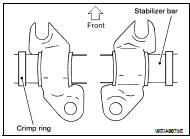
• When installing stabilizer, make sure that the clamps are facing in
the direction shown.
• Make sure the cut surface of the bushing faces the rear.
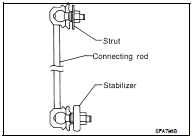
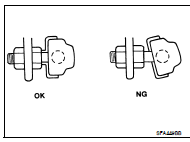
• Stabilizer uses pillow ball type connecting rod. Position ball joint
with case on pillow ball head parallel to stabilizer.
Removal and Installation
REMOVAL
1. Remove wheel and tire. Refer to WT-66, "Adjustment".
2. Remove steering knuckle from transverse link. Refer to FSU-12, "Exploded
View".
...
FRONT SUSPENSION ASSEMBLY
Exploded View
1. Strut tower bar
2. Stabilizer bar
3. Stabilizer clamp
4. Stabilizer bushing
5. Connecting rod
6. VQ35DE front mount bracket
7. VQ35DE rear mount ...
Other materials: How to use the vehicle information
display
The vehicle information display can be
changed using the ,
, and OK buttons located on the
steering
wheel.
- Use these buttons
to navigate the vehicle information
display.
OK - Change or select an item in the
vehicle information display.
- Returns to the previous
menu.
The OK, a ...
Emergency call (SOS) button (if so equipped)
Emergency support
NissanConnect Services provide various
services to support dealing with emergencies
of the subscribed vehicle and the
driver.
For example, in case of an illness or serious
injury, you can seek support by pressing
the in-vehicle Emergency Call (SOS) button
and connecting to the Nis ...
Resetting the drive computer
The drive computer is divided across three
screens:
Speed
Trip Distance & Time
Fuel Economy
1. Press the or
buttons until the
desired drive computer screen is
displayed.
2. Press the OK button to bring up the drive
computer Reset menu.
3. Use the or
to select the desired
option. Then press ...

 Transverse link
 Removal and installation