Nissan Altima (L32) 2007-2012 Service Manual: Mode door motor
Removal and Installation
REMOVAL
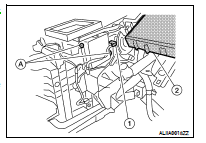
1. Remove the combination meter. Refer to MWI-176, "Removal and
Installation".
2. Remove the BCM (2). Refer to BCS-96, "Removal and Installation".
NOTE:
The illustration is shown with the heater and cooling unit assembly
out of the vehicle for clarity.
3. Disconnect the mode door motor connector (1).
4. Remove the mode door motor screws (A) and then remove the
mode door motor.
INSTALLATION
Installation is in the reverse order of removal.
Removal and Installation
REMOVAL
1. Remove the instrument panel assembly. Refer to VTL-14, "Removal and
Installation".
2. Disconnect the intake door motor connector (1).
3. Remove ...
Removal and Installation
AIR MIX DOOR MOTOR - LH
Removal
1. Remove the instrument lower cover LH. Refer to IP-12, "Removal and
Installation".
2. Remove the center console side finis ...
Other materials: Rear-facing child restraint installation
using the seat belts
WARNING
The three-point seat belt with Automatic
Locking Retractor (ALR) must be
used when installing a child restraint.
Failure to use the ALR mode will result
in the child restraint not being properly
secured. The restraint could tip over or
be loose and cause injury to a child in a
sudden stop o ...
Automatic brake hold (if so equipped)
The automatic brake hold function maintains
the braking force without the driver
having to depress the brake pedal when
the vehicle is stopped at a traffic light or
intersection. As soon as the driver depresses
the accelerator pedal again, the
automatic brake hold function is deactivated
and the bra ...
BSW system operation
For vehicles with the 7 inch (18 cm) display
Side BSW/RCTA Indicator Light
BSW indicator
The BSW system operates above approximately
20 mph (32 km/h).
If the radar sensors detect a vehicle in the
detection zone, the side BSW/RCTA indicator
light (1) illuminates. If the turn signal is
then acti ...

 Intake door motor
 Air mix door motor